

02Extract
The details, already organized.
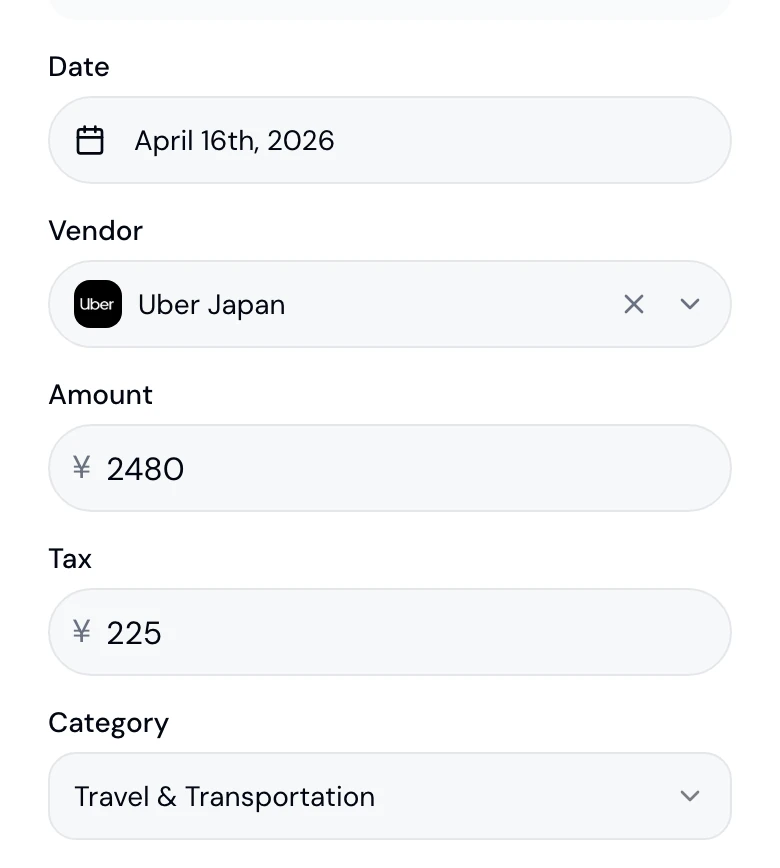
One pass reads the date, vendor, amount, the tax split and the account category, then says how sure it is. Every field stays editable and the original stays attached.
Three scans free, no card. Paid plans take a card at checkout and start a 7-day trial.

What Extract gives you
Every field, one pass
Date, vendor, amount, tax by rate, category, document type, currency, payment method and registration number.
8% and 10%, kept apart
Japanese receipts keep the reduced and standard consumption-tax lines separate. Other markets get their own GST or SST rate.
High, medium or low
Every record carries the model's confidence for that document, so you know which ones to check first.
Four account sets
The eleven Japanese 勘定科目, plus the local categories for Hong Kong, Singapore and Malaysia.
Fields
Read once, in full
The document goes in and a record comes out: date, vendor, amount, the tax split by rate, the account category, the document type and the registration number when one is printed.
A Japanese 登録番号 is checked for shape and check digit on the spot. The confidence level sits at the bottom of the form, where you will look for it.
 スターバックス
Review
Correct it once
Every field is a field, not a suggestion. Change what needs changing in the form, and give a vendor a default category so its next receipt takes it when the model is unsure.
Each record keeps its confidence level. The detail sheet shows it, and the Agent can list the low-confidence ones so a review starts with the exceptions.
Accounts
The right account, in your market
Japan gets the eleven standard 勘定科目. Hong Kong, Singapore and Malaysia get the categories their own filings use. The pick is marked as a suggestion and takes one tap to change.
Add your own categories and document types when the standard set does not fit. They appear in the same picker.

Vendor
Starbucks
Amount
¥850
Date
Apr 15, 2026
Category
- 旅費交通費
- 会議費AI pick
- 交際接待費
- 消耗品費
- 通信費
- 水道光熱費
- 地代家賃
- 賃借料
- 支払手数料
- 雑費
- その他
Vendors
Vendors, tidied
Receipts from the same shop group under one vendor with its logo, however the till spelled the name. Merge stray spellings in one step.
Recurring charges show up as the pattern they are, so a subscription is one vendor with twelve receipts rather than twelve vendors.
Recurring vendors
Vendors
- Google Cloud3 aliases24 receipts通信費3 aliases · 24 receipts
- Zoom2 aliases12 receipts通信費2 aliases · 12 receipts
- Adobe4 aliases18 receipts通信費4 aliases · 18 receipts
- Figma1 aliases12 receipts通信費1 aliases · 12 receipts
- Starbucks2 aliases9 receipts会議費2 aliases · 9 receipts


5 vendors · 12 aliases merged
Currency
Any currency, booked in yours
A foreign-currency receipt is converted into your filing currency with the European Central Bank rate for the transaction date.
The original amount, the rate, its date and its source stay on the record, so anyone checking can follow the conversion.

AWS
$89.50 USD

Foreign Currency Expense
$89.50USD
¥13,425
USD · GBP · EUR · JPY · SGD · HKD · +25 more
Savings
What each receipt gives back
Every record shows the tax it is estimated to save, using your own marginal rate once you set your taxable income in Settings.
Est. tax reduction
¥8,640
Sample figure
Until then the estimate uses a default bracket for your market. It is an estimate, and the product says so.
What this step means for you
- Freelancers
- Confirm the category once and the saving shows on every record after it.
- Denpyo for freelancers
- Businesses
- Team receipts land categorised and marked with their confidence, so review starts with the exceptions.
- Denpyo for Business
- Accounting firms
- Low-confidence records surface first in your worklist, per client.
- Denpyo for practices
Questions
Which fields are extracted?+
Date, vendor, amount, currency, the tax split by rate, account category, document type, payment method and the invoice or registration number, plus a confidence level for the document as a whole.
How is the tax saving estimated?+
From the deductible amount and your marginal rate, once your taxable income is set in Settings. Before that, Japan assumes roughly a 30% combined rate; other markets have their own defaults. It is a planning estimate, not a filing figure.
Can I add my own categories?+
Yes. Custom categories and custom document types are yours to define, alongside the standard set for your market: the eleven Japanese 勘定科目, or the local sets for Hong Kong, Singapore and Malaysia.
How are foreign currencies converted?+
With European Central Bank reference rates for the transaction date. The rate, its date and its source are stored on the record, and the amount is converted into your filing currency.
See your own receipts read.
Three scans free. Every field on this page is one you can check against the paper.