

Free invoice maker for Japan
Make a qualified invoice (適格請求書) in minutes. Consumption tax and withholding are worked out for you; download a PDF, or send your client a link with your payment details.
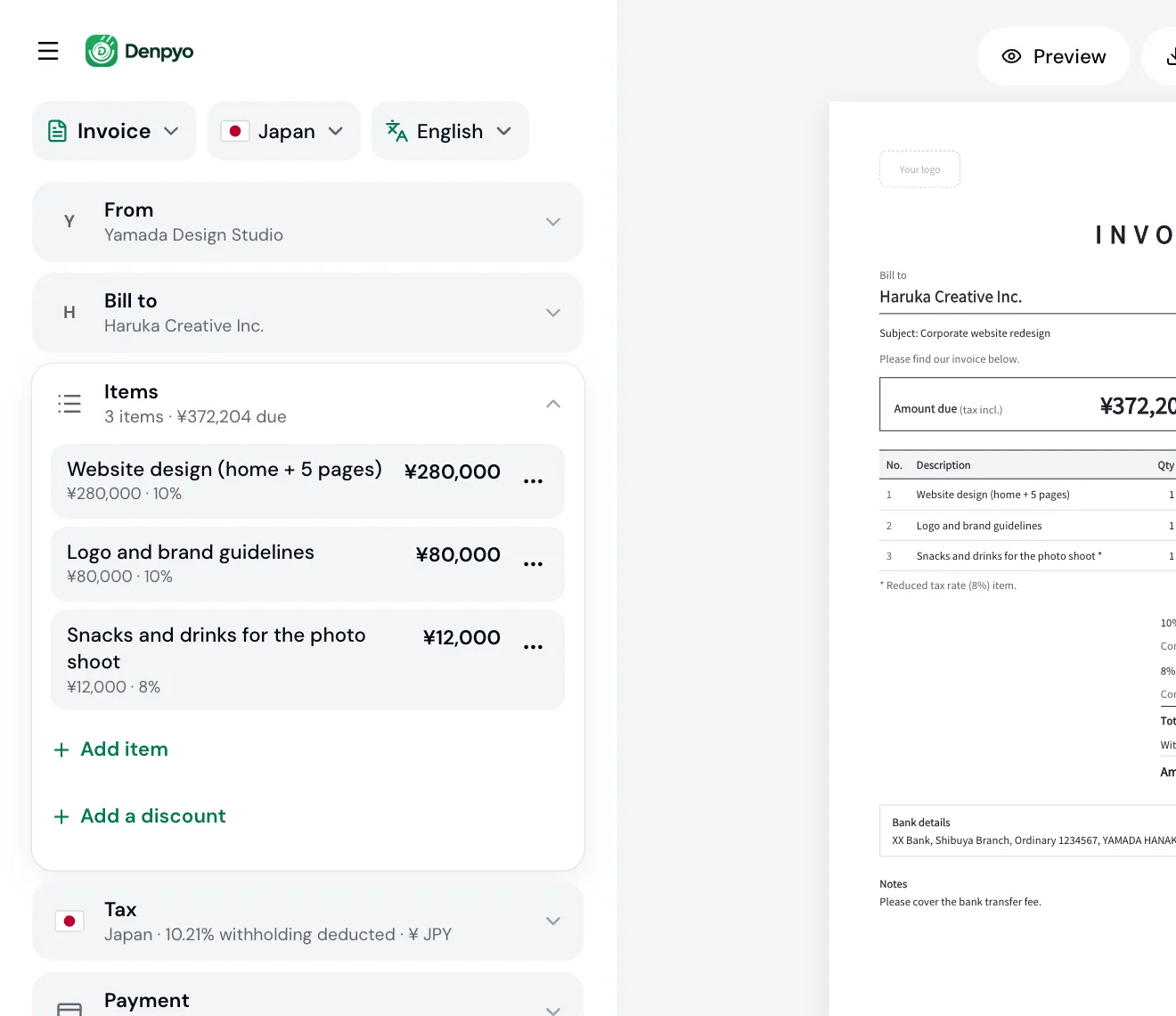

Fill in who, what and how much. Tax and totals are worked out as you type.
- No account needed
- PDF download
- Works on your phone
How it works
Create
Add your details, your client and what you did. Totals and any tax are worked out as you type, and you can download the PDF without an account.
Send
Sign up free to share the invoice as a link by LINE, WhatsApp or email, or have Denpyo email it for you. Your client opens it on any phone, with your bank details ready to copy.
Track
Your invoices list shows which ones haven't been opened, which have, and which are paid. We tell you when your client opens the link, and you mark the invoice paid when the money arrives.
Get paid
Your invoice carries your bank details, plus your own payment link if you add one. When the money arrives, mark the invoice paid: it gets a Paid stamp and your list stays right.
Try it with your own invoice
Type a client, an item and an amount. The invoice below is drawn by the same engine that makes your PDF.
Your client pays
¥372,204
- Subtotal
- ¥372,000
- Consumption tax
- +¥36,960
- Withholding tax
- −¥36,756
Try your own client, item and amount. What you type comes with you when you start your invoice.
Built for invoicing in Japan
Qualified-invoice ready
Your registration number, the tax for each rate and every other required item, laid out the way the invoice system (インボイス制度) expects.
Withholding worked out
Switch on 源泉徴収 and the invoice deducts 10.21% (20.42% on any amount over ¥1,000,000) and shows what your client actually pays.
A link with your payment details
Share the invoice as a link with your bank details and your own payment link, and see when your client opens it.
Invoices, quotes, delivery notes and receipts
One editor for 請求書, 見積書, 納品書 and 領収書, printed in Japanese, English or one of six other languages.
Invoicing in Japan: a practical guide
What a Japanese invoice has to show, how consumption tax and withholding are calculated, and when to use the other documents. Plain-language notes, with links to the National Tax Agency (NTA) at the end.
The six items on a qualified invoice
Under the invoice system (インボイス制度), which started in October 2023, your client can only deduct the consumption tax they pay you if they keep a qualified invoice from you. Article 57-4(1) of the Consumption Tax Act lists what it must show:
- Your name or business name, and your registration number (登録番号)
- The date of the sale or service
- What you sold or provided, marking any items taxed at the reduced rate
- The total for each tax rate, before or including tax, and the rate applied
- The consumption tax for each rate
- Your client's name or business name
Only registered businesses (適格請求書発行事業者) can issue qualified invoices. If you are not registered, you can still send an invoice: just leave the registration number off.
Consumption tax: once per rate, per invoice
Add up the items at each rate (10% standard, 8% reduced) and calculate the tax once for each rate. Rounding each line and adding up the results is not allowed. You can round the fraction of a yen down, up or to the nearest yen; Denpyo rounds down unless you change it.
Example: two items of ¥1,005 at 10%. Rounding each line gives ¥200, but the correct tax, calculated once on ¥2,010, is ¥201.
Withholding tax (源泉徴収)
When a business pays an individual for certain work, such as writing, design, illustration, lectures or professional services, it withholds income tax from the fee and pays it to the tax office. Show the deduction on your invoice so you and your client agree on the amount paid.
Fee up to ¥1,000,000: fee × 10.21%
Fee over ¥1,000,000: (fee − ¥1,000,000) × 20.42% + ¥102,100
For a fee of ¥300,000, the withholding is ¥30,630; for ¥1,500,000, it is ¥204,200. Fractions of a yen are dropped.
If the consumption tax is shown separately on the invoice, withholding can be calculated on the fee before tax, which is Denpyo's default. Not every client has to withhold (an individual who pays no salaries, for example), so you choose whether to switch it on.
Registration numbers (T-numbers)
A registration number is the letter T followed by 13 digits. Companies use their corporate number; sole proprietors are given a separate number by the NTA. Denpyo checks the format as you type, and the check digit of corporate numbers, but it does not look the number up in the NTA's register. To confirm a number is registered, search the NTA publication site.
NTA publication site for qualified invoice issuersBank transfer fees (振込手数料)
Unless you have agreed otherwise, the cost of paying falls on the payer (Civil Code, Article 485), so the transfer fee is normally your client's. Say so on the invoice, for example 「振込手数料は貴社にてご負担ください」, to avoid short payments. If a client deducts the fee anyway, you can treat the difference as a discount on the sale; for less than ¥10,000, you don't need to issue a return invoice (返還インボイス).
Revenue stamps (収入印紙)
A paper receipt (領収書) for a sale of ¥50,000 or more needs a revenue stamp, starting at ¥200. If the consumption tax is shown separately, the amount before tax decides. A receipt sent as a PDF, by email or by link, is not a paper document and needs no stamp. Invoices, quotes and delivery notes don't need one either, unless they are marked to show you have been paid.
Quote, delivery note, invoice or receipt?
Four documents follow a job from start to finish, and each one has a different purpose:
- Quote (見積書)
- Sent before the work starts: the price, scope and terms you propose, usually with an expiry date. It doesn't ask for payment.
- Delivery note (納品書)
- Goes with the goods or finished work and records what was delivered and when. If it shows the six required items, it can also serve as a qualified invoice.
- Invoice (請求書)
- Asks for payment: the amount due, the due date and how to pay. In Japan it is common to bundle a month's work into one invoice.
- Receipt (領収書)
- Confirms you have been paid. With a bank transfer the transfer record often serves as proof, but issue one if your client asks; on paper, check the revenue stamp rule above.
Frequently asked questions
Is the invoice maker really free?
Yes. You can make invoices and download them as PDFs without an account, up to 3 downloads a day. A free Denpyo account lets you save your invoices and share them by link.
Can I make a qualified invoice (適格請求書)?
Yes. Add your registration number and the invoice shows all six required items, with the total and consumption tax for each rate calculated once per invoice.
I'm not registered for the invoice system. Can I still use it?
Yes. Leave the registration number blank and you get a regular invoice. Under the transitional rules, your client can then deduct only part of the consumption tax on it.
How is withholding tax calculated?
On a fee of up to ¥1,000,000 it is 10.21% of the fee; above that, 20.42% of the amount over ¥1,000,000, plus ¥102,100. A fee of ¥300,000 has ¥30,630 withheld. If consumption tax is shown separately, the fee before tax is used.
Does Denpyo verify my registration number with the NTA?
No. Denpyo checks that the number is in the right format (T plus 13 digits) and, for corporate numbers, that the check digit is valid. It does not query the NTA's register, so confirm the number on the NTA publication site.
Who pays the bank transfer fee?
Unless you have agreed otherwise, the payer does. Say who pays it on the invoice to avoid short payments.
Does my receipt need a revenue stamp?
Only a paper receipt for ¥50,000 or more does. A receipt sent as a PDF or a link needs no stamp.
Can I make the invoice in English?
Yes. You choose the invoice's language (Japanese, English or one of six others) separately from the app's language, so you can work in your own language and send your client the version they need.
Where is my invoice stored?
Your invoice is saved only in this browser until you sign up. To show company logos, we look up the names and websites you type. The PDF is created on your device.
Send your next invoice in minutes
No account and nothing to install. Start on your phone or your computer.
Make an invoice, free